MIMI Multi-Agent System: Usage and Configuration Guide
1. What does "Multi-Agent" mean?
A single company can operate multiple Artificial Intelligence voice agents within the same MIMI account.
- Each agent can handle both inbound and outbound calls.
- The multi-agent workspace allows the company to manage specific prompts, calls, statistics, outbound call settings, phone numbers, and associated records from a single account.
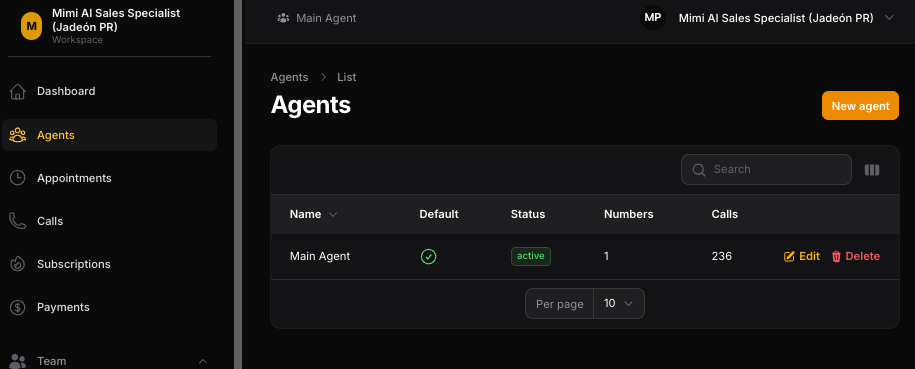
Practical Example:
- Main Agent: The company's default agent. They can answer and make calls using the company's main number.
- Tax/Accounting Agent (Tax Agent): A second agent within the same company. They can answer and make calls using the Tax number.
- Default Agent = Main Agent: The Default Agent is the company's Main Agent. This is the primary agent and serves as the main fallback when a fallback behavior applies.
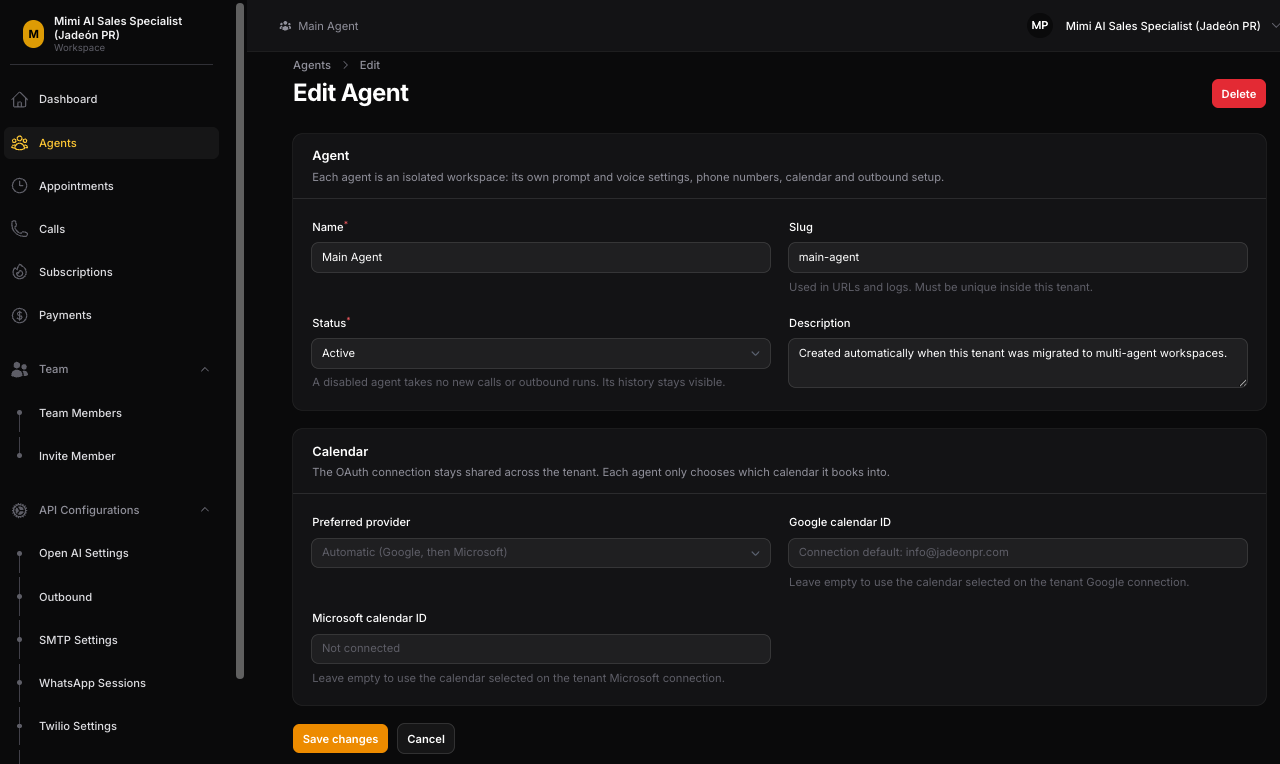
2. Multi-Agent Workspace
The Agent Selector (located in the platform's top bar) allows the administrator to switch between the different workspaces of each agent without needing to create separate company accounts.
What is available and managed for each Agent:
- OpenAI Prompts and Configuration: Managed specifically for the selected agent.
- Call History: Directly associated with the agent who handled the interaction.
- Analytics and Statistics: Displayed within the context of the selected agent.
- Outbound Calls: Each agent can have their own outbound configuration.
- Phone Numbers: Different phone numbers can be assigned to different agents.
- Health Warning / OpenAI Quota: Displays the quota status based on the selected agent.
📌 Useful Clarification on Routing: The Agent Selector only changes your on-screen administrative workspace. It does not, on its own, determine which agent answers an incoming call. Incoming call routing relies on the configured phone number. Outbound calls use the agent assigned to the outbound task.
3. Shared Connections and Agent Configuration
Certain provider connections remain shared at the company (Tenant) level, while agent-specific support configurations are managed within their individual workspaces:
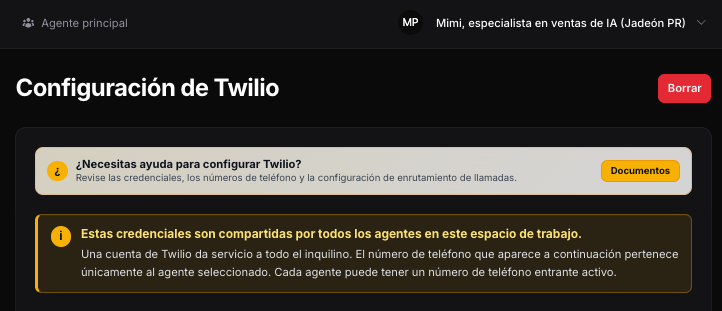
--Twilio:
- The Twilio account connection is shared across the entire company.
- Different Twilio phone numbers can be assigned to different agents (e.g., Main Number > Main Agent | Tax Number > Tax Agent).
--Google Calendar:
- The Google account connection is shared at the company level.
- Agents can use their specific calendar configuration to schedule appointments (e.g., Main Agent > Main Office Calendar | Tax Agent > Tax Calendar).
--Microsoft Calendar:
- The Microsoft Calendar connection remains a company-level connection when in use.
--Google Sheets for Outbound Calls:
- The Google Sheets connection is shared across the company.
- Each agent can use their own configured sheet or tab for outbound data.
--Business Hours and Scheduling:
- Business hour overrides and agent-specific scheduling rules can be applied where configured.
--Websocket Settings:
- Websocket settings are managed within the context of the selected agent.
4. Inbound and Outbound Calls
--Inbound Calls
These are primarily routed based on the phone number the client calls (e.g., *Main Number* > *Main Agent* | *Tax Number* > *Tax Agent*). Once the agent is determined, MIMI uses that agent's corresponding prompt and execution settings.
--Outbound Calls
Each agent can make outbound calls. The outbound task (*job*) is assigned to an agent, and MIMI loads that agent's outbound configuration.
- Main Agent: Can receive calls on the Main Number and make outbound calls using their outbound configuration.
- Tax Agent: Can receive calls on the Tax Number and make outbound calls using their own outbound configuration.
--Logs and Statistics
Call logs and visible statistics are associated with the corresponding agent so the administrator can review activity in an organized manner.
5. WhatsApp and Post-Call Activity
- Post-Call WhatsApp: Uses the connected session of the agent who handled the call. This keeps WhatsApp activity aligned with the context of the corresponding agent.
- WhatsApp Connection: The main WhatsApp integration remains part of the company-level configuration.
- Post-Call Triggers: Agent-specific configurations can be used where available. If an agent lacks a specific configuration for a given item, MIMI will use the default/shared trigger.
- OpenAI Quota Status: The quota/health warning displayed on the dashboard reflects the currently selected agent.
6. Simple Agent Setup (Step-by-Step)
- Step 1 - Create and Select the Agent: Go to the **Agents** section in the side menu, click **New agent**, create and activate it, then select it using the Agent Selector.
- Step 2 - Set the Main Agent: Define the **Default Agent** to act as the Main Agent.
- Step 3 - Configure OpenAI Prompt and Settings: Set up the instructions (prompt) and OpenAI settings for the selected agent.
- Step 4 - Assign Phone Number: Assign the correct phone number to the agent from the shared Twilio account.
- Step 5 - Configure Calendar and Hours: Select the calendar provider (Google or Microsoft), assign the calendar ID, and configure business hours or scheduling parameters.
- Step 6 - Configure Outbound Calls: Define the outbound settings for the selected agent.
- Step 7 - Configure Outbound Sheet/Tab: Use the shared Google Sheets connection and configure the specific sheet or tab used for that agent's outbound call data.
- Step 8 - Configure Triggers (If Necessary): Use an agent-specific trigger when required; otherwise, the default/shared trigger will be used.
- Step 9 - Review Agent Dashboard: Check calls, statistics, outbound activity, and OpenAI quota/health information for the selected agent.
7. Final Summary of Functions
- Multi-Agent Workspace: Allows a company to manage multiple AI agents from a single account.
- Calls: Each agent can handle inbound and outbound calls.
- Default Agent: Acts as the Primary Agent.
- Agent Selector: Switches between workspaces.
- Prompts / OpenAI: Available on a per-agent basis.
- Analytics / Logs: Filtered based on the active agent's context.
- Shared Company Connections: The Twilio account, Microsoft Calendar connection, SMTP connection, and primary WhatsApp integration remain at the company level. This centralizes provider configuration while keeping each agent's workspace separate.
Le resultó útil?
( 0 de 0 lo encontró útil )